RadListView Item Templates
By default when using the
RadListView
in order for the items from its data source to be visualized all
that you need to do is declare your own
itemTemplate
and set it to the desired UI View. This will make sure that each
of the business objects of the passed to the
items
property are visualized using that template, but there are
scenarios where you may want to use different template for
specific business objects (different sections, important
business objects, more detailed objects etc.). IN such scenarios
the the
itemTemplates
can be used.
Using Multiple Item Templates
In order to setup the
RadListView
to use different templates for its items representation you will
need to:
-
Create a function or pass a string representation of a
"property" by which the template for each business object will
be determined. This is done by setting the
itemTemplateSelectorproperty -
Create multiple separate
ng-template, add them to theitemTemplatescollection property and set theirtkTemplateKeyto the desired unique template identifier. ThetkTemplateKeyis a custom directive and is what will be used to do the comparison in theitemTemplateSelector
Example 1: Setting up itemTemplateSelector and
itemTemplates
In the code snippets bellow we are declaring multiple
<ng-template></ng-template> instances
in the HTML. After that we are creating a function in our
Angular Component that simply returns the property
of the business object that will be used to determine FFthe
template of its item representation and finally we are binding
that function to the
itemTemplateSelector
property:
<RadListView [items]="dataItems" [itemTemplateSelector]="templateSelector">
    <ng-template tkListItemTemplate let-item="item">
        <StackLayout orientation="vertical">
            <Label [text]="item.name" class="nameLabel"></Label>
            <Label [text]="item.type" class="typeLabel middleLabel"></Label>
            <Label [text]="item.description" class="descriptionLabel"></Label>
        </StackLayout>
    </ng-template>

    <ng-template tkTemplateKey="start" let-item="item">
        <StackLayout orientation="vertical" class="blackStackLayout">
            <Label [text]="item.name" class="nameLabel yellowText"></Label>
            <Label [text]="item.type" class="typeLabel yellowText middleLabel"></Label>
            <Label [text]="item.description" class="descriptionLabel yellowText"></Label>
        </StackLayout>
    </ng-template>
    <ng-template tkTemplateKey="Red" let-item="item">
        <StackLayout orientation="vertical" class="redStackLayout">
            <Label [text]="item.name" class="nameLabel whiteText"></Label>
            <Label [text]="item.type" class="typeLabel whiteText"></Label>
        </StackLayout>
    </ng-template>
    <ng-template tkTemplateKey="green" let-item="item">
        <StackLayout orientation="vertical" class="greenStackLayout">
            <Label [text]="item.name" class="nameLabel whiteText"></Label>
            <Label [text]="item.type" class="typeLabel whiteText"></Label>
        </StackLayout>
    </ng-template>
    <ng-template tkTemplateKey="Blue" let-item="item">
        <StackLayout orientation="vertical" class="blueStackLayout">
            <Label [text]="item.name" class="nameLabel whiteText"></Label>
            <Label [text]="item.type" class="typeLabel whiteText"></Label>
        </StackLayout>
    </ng-template>
    <ng-template tkTemplateKey="End" let-item="item">
        <StackLayout orientation="vertical" class="yellowStackLayout">
            <Label [text]="item.name" class="nameLabel blackText"></Label>
            <Label [text]="item.type" class="typeLabel blackText middleLabel"></Label>
            <Label [text]="item.description" class="descriptionLabel blackText"></Label>
        </StackLayout>
    </ng-template>
</RadListView>
import { Component, OnInit } from "@angular/core";
import { ObservableArray } from "tns-core-modules/data/observable-array";
import { DataItem } from "../dataItem";
import { DataItemService } from "../dataItem.service";

@Component({
    moduleId: module.id,
    selector: "tk-listview-multiple-templates",
    providers: [DataItemService],
    templateUrl: "listview-multiple-templates.component.html",
    styleUrls: ["listview-multiple-templates.component.css"]
})
export class ListViewMultipleTemplatesComponent implements OnInit {
    private _dataItems: ObservableArray<DataItem>;
    private _templateSelector: (item: DataItem, index: number, items: any) => string;

    constructor(private _dataItemService: DataItemService) {
    }

    get dataItems(): ObservableArray<DataItem> {
        return this._dataItems;
    }

    ngOnInit() {
        this._dataItems = new ObservableArray();
        this._templateSelector = this.templateSelectorFunction;
        let itemsCount = 50;
        for (let i = 0; i <= itemsCount; i++) {
            this._dataItems.push(new DataItem(i, "Item " + i, "This is item description", undefined, undefined, undefined, undefined, this.getType(i, itemsCount)));
        }
    }

    private getType(index: number, end: number): string {
        let lastDigit = index % 10;
        let type = index === 0 ? "start" : index === end ? "end" : undefined;
        if (!type) {
            type = lastDigit === 0 ? "default" : lastDigit <= 3 ? "red" : lastDigit <= 6 ? "blue" : lastDigit <= 9 ? "green" : "default";
        }

        return type;
    }

    get templateSelector(): (item: DataItem, index: number, items: any) => string {
        return this._templateSelector;
    }

    set templateSelector(value: (item: DataItem, index: number, items: any) => string) {
        this._templateSelector = value;
    }

    public templateSelectorFunction = (item: DataItem, index: number, items: any) => {
        return item.type;
    }
}
.nameLabel {
    font-size: 20;
    margin: 5;
}

.typeLabel {
    font-size: 17;
    margin: 5;
}

.middleLabel{
    margin: 0 5 0 5;
}

.descriptionLabel {
    font-size: 14;
    margin: 5
}

.yellowText {
  color: yellow;
}

.whiteText {
  color: white;
}

.blackText {
  color: black;
}

.blackStackLayout {
    background-color: black;
}

.redStackLayout {
    background-color: red;
}

.greenStackLayout {
    background-color: green;
}

.blueStackLayout {
    background-color: blue;
}

.yellowStackLayout {
    background-color: yellow;
}
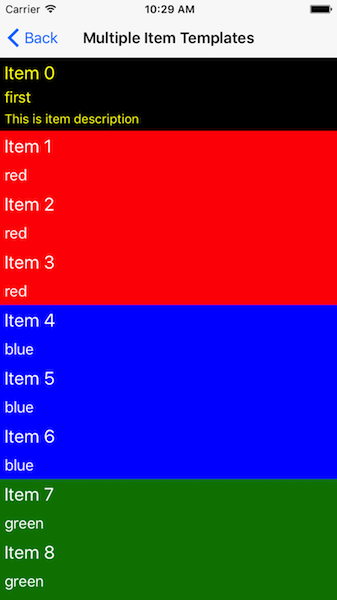
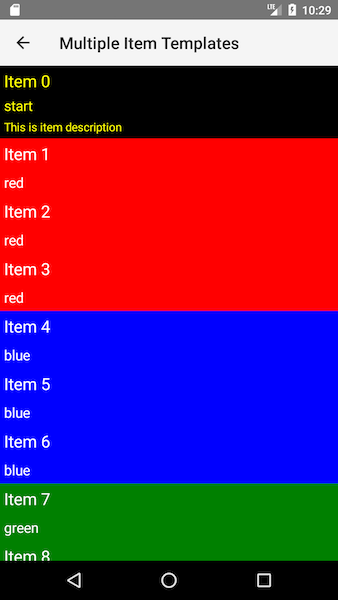
Figure 1: RadListView with multiple item templates:
References
Want to see this scenario in action? Check our SDK examples repo on GitHub. You will find this and many other practical examples with NativeScript UI.